Glasgow, one of the UK’s most vibrant cities, boasts a thriving digital marketing scene. eCommerce businesses must navigate an increasingly competitive environment to attract and retain customers. One of the most crucial strategies for achieving this is through SEO. SEO helps eCommerce businesses enhance their online visibility, driving organic traffic to their websites. By optimising their websites for search engines, eCommerce businesses can appear higher in search results, making it easier for potential customers to find their products or services. Glasgow’s digital marketing landscape is characterised by a diverse array of agencies offering a wide range of services, from SEO and content marketing to social media management and pay-per-click (PPC) advertising. Effective SEO strategies can lead to increased brand awareness, higher conversion rates, and ultimately, greater revenue. Without a strong SEO foundation, even the most well-designed eCommerce websites may struggle to achieve their full potential in terms of traffic and sales.
The city is home to numerous agencies that specialise in eCommerce SEO, helping local businesses compete not only within the UK but also on a global scale. These agencies employ the latest tools and techniques to ensure their clients achieve optimal online visibility and performance.
Table of Contents
- Introduction
- Purpose of the Article
- Undersanding SEO for Ecommerce
- Key Components of Ecommerce SE
- How Ecommerce SEO Differs from General SEO
- Marketing Mavens Approach to Ecommerce SEO
- Improving Site Structure and Navigation
- Case Study
- Conclusion
1. Introduction to Marketing Mavens
Among the top advertising and marketing agencies in Glasgow, Marketing Mavens stands out as a premier SEO agency for eCommerce. With a proven track record of delivering exceptional results, Marketing Mavens has established itself as a trusted partner for businesses looking to enhance their online presence. The agency is renowned for its comprehensive approach to SEO, combining technical expertise with creative strategies to drive sustainable growth for its clients.
Marketing Mavens team of seasoned professionals is dedicated to staying ahead of industry trends, ensuring that their clients benefit from cutting-edge SEO practices. Whether it’s optimising product pages, improving site architecture, or crafting compelling content, Marketing Mavens offers tailored solutions designed to meet the unique needs of eCommerce businesses.
2. Purpose of the Article
This article aims to provide an in-depth review of Marketing Mavens, highlighting why it is considered one of the top advertising and marketing agencies for eCommerce SEO in Glasgow. By exploring the importance of SEO for eCommerce, the digital marketing landscape in Glasgow, and the specific services and strategies offered by Marketing Mavens, we hope to offer valuable insights for businesses seeking to enhance their online presence. Additionally, we will delve into case studies and client testimonials to illustrate the tangible benefits of partnering with Marketing Mavens. Ultimately, this article serves as a comprehensive guide for eCommerce businesses looking to navigate the complex world of SEO and digital marketing, with a focus on leveraging the expertise of Marketing Mavens to achieve their goals.
3. Understanding SEO for Ecommerce
Search Engine Optimisation (SEO) is the practice of enhancing a website’s visibility on search engine results pages (SERPs) through organic (non-paid) techniques. For eCommerce businesses, SEO is paramount as it directly influences the ability to attract potential customers who are actively searching for products or services. An effective SEO strategy ensures that an eCommerce site ranks highly for relevant search queries, thereby increasing traffic, enhancing brand credibility, and driving conversions. Without SEO, an eCommerce website may remain virtually invisible to potential customers, regardless of the quality of its products or services.
Boost eCommerce
SEO with Experts
Enhance your online store’s visibility. Contact Marketing Mavens in Glasgow today!
Optimise Your Store
Improve your store’s search rankings with tailored eCommerce SEO strategies.
Attract More Visitors
Drive targeted traffic to your store through effective SEO techniques.
Increase Sales Conversion
Turn visitors into customers with enhanced eCommerce SEO solutions.
4. Key Components of Ecommerce SEO
An SEO agency for eCommerce focuses on several key components to ensure a holistic approach to improving a website’s search engine ranking. These components include On-Page SEO, Off-Page SEO, and Technical SEO, each of which plays a critical role in the overall effectiveness of an SEO strategy.
4.1: On-Page SEO
On-Page SEO involves optimising individual web pages to rank higher and earn more relevant traffic. This includes optimising product descriptions, meta tags (title tags and meta descriptions), header tags (H1, H2, etc.), and images. For eCommerce sites, it also means ensuring that product pages are optimised with targeted keywords, high-quality content, and user-friendly navigation. Effective On-Page SEO helps search engines understand the content of the page, making it easier for them to match the page with relevant search queries.
4.2: Off-Page SEO
Off-Page SEO refers to activities performed outside the website to improve its ranking on SERPs. This primarily involves building high-quality backlinks from reputable websites, which signal to search engines that the eCommerce site is a trusted and authoritative source. Other Off-Page SEO strategies include social media marketing, influencer partnerships, and online reviews. An SEO agency for eCommerce in Glasgow, like Marketing Mavens, leverages a robust Off-Page SEO strategy to enhance the online reputation and visibility of their clients’ websites.
4.3: Technical SEO
Technical SEO focuses on optimising the backend structure and performance of a website. This includes improving site speed, ensuring mobile-friendliness, creating an XML sitemap, and enhancing site security with HTTPS. For eCommerce websites, technical SEO is crucial as it ensures that the site is easily crawlable and indexable by search engines. Additionally, a well-optimised site provides a better user experience, which can lead to higher engagement and conversion rates.
5. How Ecommerce SEO Differs from General SEO
While the fundamental principles of SEO apply to all types of websites, eCommerce SEO has distinct characteristics and challenges. One of the main differences is the focus on product pages. Unlike general websites that may prioritise blog posts or service pages, eCommerce sites must ensure that each product page is optimised for search engines. This involves using unique and detailed product descriptions, high-quality images, and clear calls to action.
Ecommerce SEO also requires managing large inventories and dealing with potential issues like duplicate content, which can arise from multiple product variations. An effective SEO agency for eCommerce will implement strategies to mitigate these issues, such as using canonical tags and creating distinct URLs for different product variations.
Furthermore, eCommerce SEO must address the customer journey, from awareness to conversion. This means optimising not only for search engines but also for user experience (UX), ensuring that the site is easy to navigate, loads quickly, and provides a seamless shopping experience across all devices.
SEO for eCommerce involves a comprehensive approach that encompasses On-Page, Off-Page, and Technical SEO, with a particular emphasis on product pages and user experience. An SEO agency for eCommerce in Glasgow, such as Marketing Mavens, understands these nuances and employs tailored strategies to help eCommerce businesses achieve higher visibility and better performance in search engine rankings.

6. Marketing Mavens Approach to Ecommerce SEO
6.1: Initial Consultation and Audit

Marketing Mavens begins its eCommerce SEO process with a thorough initial consultation and audit. This crucial first step involves understanding the client’s business goals, target audience, and current online presence. The team at Marketing Mavens conducts an in-depth audit of the client’s website to identify strengths, weaknesses, and opportunities for improvement. This audit covers various aspects such as site structure, page load speed, mobile-friendliness, and existing SEO performance.
When Marketing Mavens embarks on an eCommerce SEO project, the process begins with a detailed initial consultation and audit. This foundational step is essential for tailoring an SEO strategy that aligns with the client’s unique needs and goals. Here’s a step-by-step breakdown of what this process entails:
1. Initial Consultation
- Understanding Business Goals: The consultation starts with a deep dive into the client’s business objectives. This involves discussing the company’s vision, target market, and specific goals for their online presence.
- Identifying Target Audience: The team examines who the client’s ideal customers are, including their demographics, interests, and online behaviour. This helps in aligning SEO efforts with the audience’s needs.
- Assessing Current Online Presence: Marketing Mavens reviews the client’s existing online footprint, including their website’s performance, current SEO practices, and any ongoing marketing campaigns.
2. Comprehensive Website Audit
The audit is a critical component of the SEO process. It provides a thorough analysis of the client’s website to uncover strengths, weaknesses, and areas for improvement. The audit covers a wide range of factors, including:

- Website Security
-
- SSL Certificate: Check if the security certificate is up-to-date, valid, and correctly configured. Look for any potential issues such as expired certificates or mismatched names.
- Encryption Protocol: Ensure that the site uses the latest encryption algorithms and secure HTTP (HTTPS).
- Mixed Content: Identify and resolve any mixed content issues where secure and non-secure elements are present on the same page.
- Crawling and Indexing
-
- XML Sitemap: Evaluate the sitemap for size, completeness, and accuracy. Ensure it’s free of errors such as non-canonical pages or noindex directives.
- Robots.txt File: Check for the presence of the robots.txt file and its configuration. Ensure it does not block important pages or contain disallowed directives.
- Blocked Content: Identify any content blocked by robots.txt, noindex, or X-Robots-Tag directives that might affect search engine crawling.
- Duplicate Content
-
- Identification: Detects and addresses duplicate content issues within the site to prevent search engines from penalising the site for repeating content.
- Canonical Tags: Ensure canonical tags are used properly to indicate the preferred version of a page.
- HTTP Status Codes
-
- 4XX Errors: Identify and resolve 4XX errors such as 404 Not Found, which indicate broken links or missing pages.
- 3XX Redirects: Review and test 3XX redirects to ensure they are properly configured and do not lead to redirect loops.
- 5XX Errors: Address 5XX errors such as server issues that prevent pages from loading correctly.
- Title and Meta Description Tags
-
- Optimisation: Check that title tags and meta descriptions are unique, relevant, and optimised with targeted keywords for each page.
- Usability and User Experience
-
- Navigation: Assess the site’s navigation structure for ease of use and logical flow.
- Design and Layout: Evaluate the overall design for user-friendliness, including readability and visual appeal.
- Website Speed
-
- Performance Metrics: Analyse page load speeds and identify factors that may be slowing down the site, such as large images or unoptimised code.
- Textual Content
-
- Quality and Relevance: Review content for quality, keyword optimisation, and relevance to the target audience.
- Redirects
-
- Proper Implementation: Ensure that redirects are set up correctly and do not lead to unnecessary redirect chains or loops.
- Internal and External Links
-
- Internal Linking: Check the internal link structure to ensure it supports navigation and distributes link equity effectively.
- External Linking: Evaluate external links to ensure they are relevant and enhance the site’s authority.
- Localisation
-
- Local SEO: For businesses targeting specific regions, check the implementation of local SEO practices, including location-based keywords and local business listings.
- Images
-
- Optimisation: Ensure images are properly optimised for faster loading times and include relevant alt text.
- JavaScript and CSS
-
- Optimisation: Review and optimise JavaScript and CSS files to improve site performance and avoid issues such as errors or loading failures.
- Mobile Optimisation
-
- Responsiveness: Assess the site’s mobile responsiveness and ensure it provides a seamless experience across all devices.
- Performance and AMP (Accelerated Mobile Pages)
-
- AMP Implementation: Verify the correct implementation of AMP to improve mobile page load speeds and performance.
By meticulously examining these areas, Marketing Mavens audit provides a comprehensive understanding of the website’s current state. This allows the team to develop a targeted SEO strategy that addresses specific issues and leverages opportunities for improvement, ultimately enhancing the site’s performance and search engine rankings.

6.2: Keyword Research and Strategy Development
Keyword research is a fundamental component of any effective SEO strategy. Marketing Mavens’s team uses advanced tools and techniques to identify the most relevant and high-performing keywords for the client’s eCommerce business. This involves analysing search volume, competition, and user intent to select keywords that will drive targeted traffic to the website. Once the keywords are identified, Marketing Mavens develops a comprehensive SEO strategy that integrates these keywords into various aspects of the website, including product descriptions, category pages, and blog content. This strategic approach ensures that the website ranks highly for searches that potential customers are performing.
Step-by-Step Guide to Performing Keyword Research for Ecommerce SEO
1. Initiate Keyword Research
The foundational step in any successful eCommerce SEO campaign is conducting comprehensive keyword research. This process involves identifying the specific words and phrases—referred to as keywords—that potential customers use when searching for products or services online. Effective keyword research ensures that the keywords used to optimise your product and category pages align with the search terms your target audience uses, ultimately boosting your site’s visibility and driving relevant traffic.
2. Utilise a Keyword Research Tool
To start, leverage a sophisticated keyword research tool such as the SERanking Keyword Magic Tool. Here’s a step-by-step approach to using this tool:
- Enter Your Seed Keyword: Begin by entering a seed keyword relevant to your eCommerce site into the tool’s search box. For example, if your site specialises in selling “Used Chillers,” input this term and initiate the search.

- Explore Keyword Suggestions: The tool will generate a comprehensive list of related keywords and phrases based on the seed keyword. This list provides valuable insights into the variations and related search terms potential customers might use.

3. Evaluate Keyword Relevance
Once you have a list of keyword suggestions, the next step is to determine their relevance to your site. This involves:
- Identify Relevant Keywords: Focus on keywords that are directly related to the products or categories you offer. For example, if you have a category page dedicated to “Used Chillers,” the keyword “Used Chillers” should be a primary candidate for optimisation.
- Analyse Keyword Groups: Click on the keyword groups listed in the tool to view all related keywords within that category. This helps you understand the broader keyword landscape and identify variations that may be beneficial.

4. Filter Keywords by Search Intent
Understanding search intent is crucial for aligning your content with user expectations. Search intent refers to the underlying purpose behind a user’s search query and is categorised into the following types:
- Navigational Intent: Users are seeking a specific website or page. For example, searches like “Walmart login” or “Walmart Plus” are navigational. These are less relevant for eCommerce sites focused on product sales.
- Informational Intent: Users want to gather more information about a topic. Queries such as “Where to buy Used Chillers” fall into this category. These keywords are suited for content that provides educational or informational value.
- Commercial Intent: Users are comparing products or researching options before making a purchase decision. Keywords like “best Used Chillers” are indicative of commercial intent, making them ideal for category or product pages.
- Transactional Intent: Users are ready to make a purchase. Searches such as “buy Used Chillers online” reflect transactional intent and are best suited for product pages designed to drive conversions.

5. Align Keywords with Page Types
Based on the search intent analysis, match keywords to the appropriate types of pages on your site:
- Commercial Keywords: These should be optimised for your category pages where users can explore various products. For instance, “Used Chillers” fits well with a category page showcasing different chillers available for purchase.
- Informational Keywords: These are best suited for blog posts or informational articles. For example, “Where to buy Used Chillers” would be more appropriate for a blog post that guides users on the purchasing process.
6. Use Filters to Streamline Keyword Selection
Most advanced keyword research tools, like SERanking’s Keyword Magic Tool, include an “Intent” filter. This feature allows you to quickly narrow down keywords based on their search intent:

- Filter for Commercial and Transactional Keywords: Apply the intent filter to focus on keywords that align with commercial and transactional intent. This helps you identify which keywords are most likely to drive relevant traffic and conversions for your product and category pages.
By following these steps—performing keyword research, using advanced tools, evaluating keyword relevance, filtering by search intent, and aligning keywords with page types—you can effectively optimise your eCommerce site. This strategic approach ensures that your pages are well-positioned to rank higher in search engine results, attract targeted traffic, and ultimately drive more conversions.
6.3: On-Page optimisation Techniques
On-Page SEO involves optimising individual web pages to rank higher and earn more relevant traffic. This includes optimising product descriptions, meta tags (title tags and meta descriptions), header tags (H1, H2, etc.), and images. For eCommerce sites, it also means ensuring that product pages are optimised with targeted keywords, high-quality content, and user-friendly navigation. Effective On-Page SEO helps search engines understand the content of the page, making it easier for them to match the page with relevant search queries.
- Product Descriptions
- Use unique, detailed, and engaging descriptions.
- Incorporate targeted keywords naturally.
- Highlight key features and benefits.
- Ensure readability and avoid keyword stuffing.

- Meta Tags
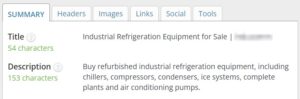
- Craft compelling and concise title tags with primary keywords.
- Write descriptive and engaging meta descriptions.
- Keep meta tags within recommended character limits (title tags: ~60 characters, meta descriptions: ~155 characters).
- Header Tags
- Use H1 tags for main titles and H2/H3 tags for subheadings.
- Include relevant keywords in header tags.
- Maintain a logical hierarchy for easy readability and SEO.
- Images
- Use high-quality images with optimised file sizes for faster loading.
- Include descriptive alt text with keywords.
- Use relevant file names for images.
- Implement image sitemaps to help search engines index images.
- Product Pages
- Optimise URLs with relevant keywords and avoid unnecessary parameters.
- Implement breadcrumb navigation for better user experience and SEO.
- Include user reviews and ratings for social proof and additional content.
- Use schema markup to enhance search results with rich snippets.
- Content Quality
- Create informative and engaging content that addresses user intent.
- Regularly update content to keep it fresh and relevant.
- Use internal links to guide users to related products and categories.
Sign up for a free
Growth and Marketing Audit
Drop us a quick note in the form, and we’ll get back to you right away with a friendly hello!
6.4: Content Creation and Marketing
High-quality content is essential for attracting and retaining customers, as well as for improving search engine rankings. Marketing Mavens content creation and marketing strategy involves producing engaging, relevant, and informative content tailored to the target audience. This includes blog posts, product guides, how-to articles, and other types of content that address common customer queries and needs. The agency also leverages content marketing to build authority and trust, using the content to attract backlinks and drive organic traffic. By consistently publishing valuable content, Marketing Mavens helps eCommerce businesses establish themselves as industry leaders.
Creating and marketing high-quality content is crucial for capturing and engaging potential customers, as well as for boosting search engine rankings. When Marketing Mavens develops a content creation and marketing strategy, they focus on crafting detailed, relevant, and compelling content specifically designed to attract and convert users interested in “Used Chillers for Sale.” Here’s a step-by-step breakdown of their approach:
1. Develop a Content Strategy
- Define Audience Needs: Understand the specific needs and questions of potential customers searching for used chillers. This involves identifying common queries, pain points, and preferences related to buying used chillers.
- Content Types: Plan to create a variety of content types that cater to different aspects of the purchasing journey. This can include:
- Blog Posts: Write informative articles that address topics such as “How to Choose the Best Used Chiller for Your Business” or “Top Factors to Consider When Buying Used Chillers.”
- Product Guides: Develop comprehensive guides that detail the specifications, benefits, and usage of different types of used chillers.
- How-To Articles: Create step-by-step instructions on relevant processes, such as “How to Inspect a Used Chiller Before Purchase” or “Maintaining Your Used Chiller for Longevity.”
2. Content Creation
- Engaging and Relevant Content: Ensure all content is not only engaging but also highly relevant to the target audience. This means addressing specific questions and providing valuable insights that help potential buyers make informed decisions.
- Keyword Integration: Seamlessly integrate keywords related to “used chillers for sale” into the content. This includes optimising headlines, subheadings, and body text with targeted phrases to improve search engine visibility.
- Quality and Detail: Focus on delivering high-quality content that is detailed and informative. For instance, a product guide should include thorough descriptions, images, and comparisons of various used chillers.
3. Content Marketing
- Build Authority: Use the content to establish the eCommerce site as an authority in the industry. Publish well-researched and comprehensive articles that showcase expertise and build trust with the audience.
- Attract Backlinks: Create content that is valuable enough to earn backlinks from reputable websites. For example, a detailed guide on used chillers might be referenced by industry blogs or news sites, contributing to higher search engine rankings.
- Drive Organic Traffic: Promote content through various channels to drive organic traffic to the site. This includes sharing content on social media platforms, leveraging email marketing campaigns, and engaging with online communities and forums related to industrial equipment and used chillers.
4. Consistent Publishing
- Regular Updates: Maintain a consistent publishing schedule to keep the content fresh and relevant. Regularly update existing content to reflect the latest information and trends in the used chillers market.
- Monitor Performance: Track the performance of published content using analytics tools. Monitor metrics such as page views, user engagement, and conversion rates to assess effectiveness and make data-driven improvements.
Marketing Mavens ensures that the content creation and marketing strategy for “Used Chillers for Sale” not only attracts and retains potential customers but also enhances the website’s authority and search engine rankings. This approach helps eCommerce businesses build a strong online presence and position themselves as leaders in the industry.
6.5: Link Building Strategies
Off-page SEO, particularly link building, plays a significant role in boosting a website’s authority and search engine rankings. Marketing Mavens implements effective link building strategies to acquire high-quality backlinks from reputable websites. This involves outreach to relevant blogs, influencers, and industry publications to secure guest posts, product reviews, and other forms of content that link back to the client’s website.
By building a strong backlink profile, Marketing Mavens enhances the credibility and visibility of the eCommerce site, leading to improved search engine rankings and increased organic traffic.
6.6: Find and Fix Technical SEO Issues
Technical SEO is a critical aspect of Marketing Mavens approach, ensuring that the website is not only user-friendly but also search engine-friendly. The agency addresses various technical elements such as site speed, mobile responsiveness, crawlability, and security (HTTPS). Marketing Mavens ensures that the website’s architecture is optimised for easy navigation and indexing by search engines. This includes creating XML sitemaps, using structured data markup, and implementing canonical tags to prevent duplicate content issues.

1. XML Sitemap Issues
- XML Sitemap is Too Large
- Issue: An XML sitemap that exceeds the maximum limit (50,000 URLs or 50MB) can be problematic. For instance, if your site lists many “Used Chillers for Sale” and the sitemap grows too large, search engines might struggle to process it effectively.
- Fix: Break the sitemap into smaller, more manageable sitemaps. For example, create separate sitemaps for different categories of used chillers or based on product types. Use a sitemap index file to link these smaller sitemaps.
- Non-Canonical Pages in XML Sitemap
- Issue: If the sitemap includes URLs for pages that are not canonical, search engines may index duplicates or non-preferred versions. For example, if your sitemap includes URLs like /used-chillers-old-model and /used-chillers-new-model but only one should be indexed, it can cause issues.
- Fix: Ensure only canonical URLs are included in the sitemap. Review your canonical tags and update the sitemap to reflect the preferred version of each page.
- Noindex Pages in XML Sitemap
- Issue: Pages marked as “noindex” should not be listed in the sitemap because they are not intended to appear in search results. For example, if you have a page like /used-chillers-for-sale/discontinued marked as “noindex,” it shouldn’t be in the sitemap.
- Fix: Remove all “noindex” pages from the sitemap. Confirm that pages meant to be indexed are correctly marked in the sitemap.
- XML Sitemap Missing
- Issue: If the XML sitemap is missing, search engines may have difficulty finding and indexing your pages. For example, if there’s no sitemap for /used-chillers-for-sale, search engines may miss these pages.
- Fix: Create and submit an XML sitemap to search engines. Use tools like Google Search Console to submit and verify the sitemap.
- XML Sitemap Not Found in Robots.txt File
- Issue: The robots.txt file should reference the XML sitemap to help search engines locate it. For instance, if your sitemap is located at /sitemap.xml but this isn’t mentioned in robots.txt, search engines may not find it.
- Fix: Add the sitemap URL to the robots.txt file. Example entry: Sitemap: https://www.example.com/sitemap.xml.
- Robots.txt File Not Found
- Issue: A missing robots.txt file means there are no directives for search engines on how to crawl your site. For example, if you don’t have a robots.txt file, search engines might crawl unnecessary pages like /used-chillers-for-sale/temp which could be irrelevant.
- Fix: Create and upload a robots.txt file to the root directory of your website with appropriate crawl directives.
2. URL and HTTP Status Code Issues
- Frame is Used
- Issue: Using frames can lead to problems with search engine indexing and user experience. For example, if your page for “Used Chillers for Sale” is displayed within a frame, it might not be indexed correctly.
- Fix: Avoid using frames. Ensure that all content is directly accessible and visible to search engines.
- URL Too Long
- Issue: Long URLs can be problematic for both users and search engines. For instance, a URL like /used-chillers-for-sale/buy-now/get-the-best-deals-on-industrial-used-chillers-for-sale is cumbersome.
- Fix: Simplify URLs to make them more user-friendly and easier for search engines to process. For example, use /used-chillers-for-sale instead.
- HTML and HTTP Header Contain Noindex
- Issue: If pages are marked with “noindex” in HTML or HTTP headers, they won’t be indexed by search engines. For example, if your “Used Chillers for Sale” page has a “noindex” tag, it won’t appear in search results.
- Fix: Remove “noindex” directives from pages that you want to be indexed. Check both HTML meta tags and HTTP headers.
- HTML and HTTP Header Contain Nofollow
- Issue: The “nofollow” directive prevents search engines from following links on a page. If applied to a page like /used-chillers-for-sale, it can hinder the page’s ability to pass link equity.
- Fix: Ensure “nofollow” is only used where necessary. Update HTML and HTTP headers to allow search engines to follow relevant links.
- Canonical Chain
- Issue: A canonical chain occurs when a page points to another canonical page, which in turn points to another, creating a chain of redirects. For example, /used-chillers-for-sale pointing to /chillers-for-sale which then points to /product-chillers.
- Fix: Resolve canonical chains by ensuring each page directly points to its final canonical URL. Use a single canonical tag per page.
- Blocked by Robots.txt
- Issue: If pages are blocked by robots.txt, they won’t be crawled or indexed. For example, if /used-chillers-for-sale/temp is blocked, it won’t be indexed.
- Fix: Update the robots.txt file to allow search engines to crawl important pages. Ensure it only blocks irrelevant or duplicate content.
- Blocked by Noindex
- Issue: Pages marked with “noindex” are excluded from search engine results. If your page for “Used Chillers for Sale” has this tag, it won’t be indexed.
- Fix: Remove the “noindex” tag from pages you want to appear in search results. Ensure all important pages are indexable.
- Blocked by Nofollow
- Issue: If a page is marked with “nofollow,” search engines won’t follow links on that page. This can affect link equity. For example, if /used-chillers-for-sale has “nofollow” on internal links, it may affect link distribution.
- Fix: Adjust the “nofollow” directives to ensure that important links are followed and link equity is passed appropriately.
- Blocked by X-Robots-Tag
- Issue: The X-Robots-Tag can be used to prevent crawling or indexing. For example, if /used-chillers-for-sale has an X-Robots-Tag preventing indexing, it won’t be included in search results.
- Fix: Review and adjust X-Robots-Tag settings to allow indexing of important content.
- rel=”canonical” from HTTP to HTTPS
- Issue: A canonical link pointing from HTTP to HTTPS can cause indexing issues. For example, if /used-chillers-for-sale is canonicalised to http://example.com/used-chillers-for-sale instead of https://example.com/used-chillers-for-sale, it can lead to mixed content issues.
- Fix: Update canonical tags to use HTTPS URLs. Ensure all canonical URLs are consistent with the secure version of your site.
- Timed Out
- Issue: Pages or resources that time out can affect site performance and indexing. For example, if a page for “Used Chillers for Sale” frequently times out, it can impact user experience and search engine crawling.
- Fix: Address server issues or performance problems causing timeouts. Ensure all pages are accessible and load quickly.
3. Security Issues
- Security Certificate Expires Soon
- Issue: An expiring security certificate can lead to trust issues and warnings in browsers. For example, if your HTTPS certificate for /used-chillers-for-sale is nearing expiration, users might see security warnings.
- Fix: Renew the security certificate before it expires to maintain a secure connection and avoid warnings.
- Outdated Security Protocol Version
- Issue: Using outdated security protocols can make your site vulnerable. For example, if your site uses an outdated version of TLS, it can be less secure.
- Fix: Update to the latest security protocols and encryption standards to ensure data security and compliance.
- Certificate Name Mismatch
- Issue: If the certificate’s name doesn’t match the domain, it can cause trust issues. For example, if the certificate is issued to www.example.com but your site uses example.com, it can cause warnings.
- Fix: Ensure the security certificate matches your domain name. Purchase or reissue a certificate with the correct domain information.
- Outdated Encryption Algorithm
- Issue: Using outdated encryption algorithms can compromise site security. For example, if your site still uses weak algorithms, it can be vulnerable to attacks.
- Fix: Upgrade to stronger, up-to-date encryption algorithms to protect user data and maintain security.
- HTTP URLs in XML Sitemap
- Issue: Including HTTP URLs in the sitemap when your site is on HTTPS can lead to mixed content issues and affect indexing. For example, if the sitemap lists http://example.com/used-chillers-for-sale instead of https://example.com/used-chillers-for-sale, it can cause problems.
- Fix: Update the sitemap to include only HTTPS URLs to ensure consistency and security.
- No HTTPS Encryption
- Issue: Without HTTPS encryption, your site may be flagged as insecure. For example, if /used-chillers-for-sale is only served over HTTP, users may see a security warning.
- Fix: Implement HTTPS encryption site-wide to secure data transmission and build trust with users.
- rel=”canonical” from HTTPS to HTTP
- Issue: Canonical links pointing from HTTPS to HTTP can cause indexing issues and security concerns. For example, if /used-chillers-for-sale canonicalise an HTTP version, it undermines the security of HTTPS.
- Fix: Ensure all canonical links use HTTPS to maintain a secure and consistent URL structure.
- Redirect from HTTPS to HTTP
- Issue: Redirects from HTTPS to HTTP can lead to security warnings and indexing issues. For example, if users are redirected from https://example.com/used-chillers-for-sale to http://example.com/used-chillers-for-sale, it can affect user experience.
- Fix: Ensure all redirects are configured to go from HTTP to HTTPS, not the other way around.
- Mixed Content
- Issue: Mixed content occurs when HTTPS pages include HTTP resources, leading to security warnings. For example, if your HTTPS page for “Used Chillers for Sale” loads HTTP images or scripts, it can cause problems.
- Fix: Update all resources on HTTPS pages to use HTTPS URLs. Replace or update any mixed content to ensure a fully secure page.
4. HTTP Status Code Issues
- 4XX Pages in XML Sitemap
- Issue: Including pages with 4XX status codes (e.g., 404 Not Found) in the sitemap can negatively impact SEO. For example, if your sitemap includes /used-chillers-for-sale/old-model, which returns a 404 error, it can harm search engine indexing.
- Fix: Remove or fix all 4XX error pages in the sitemap. Ensure all listed URLs return a valid response.
- 3XX Redirects in XML Sitemap
- Issue: Pages with 3XX redirects (e.g., 301 Moved Permanently) should be handled carefully in sitemaps. For example, if your sitemap lists /used-chillers-for-sale but it redirects to /chillers-for-sale, it should be updated.
- Fix: Update the sitemap to reflect the final destination of redirected pages. Ensure that the sitemap only lists the final, canonical URLs.
- 5XX Pages in XML Sitemap
- Issue: Pages with 5XX status codes (e.g., 500 Internal Server Error) in the sitemap indicate server issues. For example, if /used-chillers-for-sale returns a 500 error, it can affect indexing and user experience.
- Fix: Address server issues causing 5XX errors. Ensure all URLs in the sitemap are accessible and return a 200 OK status.
- 3XX HTTP Status Code
- Issue: Excessive or misconfigured 3XX redirects can impact SEO by causing redirect chains or loops. For example, if /used-chillers-for-sale redirects to /chillers-for-sale, which then redirects to /products-chillers, it can create unnecessary complexity.
- Fix: Review and streamline redirect chains. Ensure redirects are set up properly to avoid loops or excessive redirects.
- 4XX HTTP Status Codes
- Issue: Pages returning 4XX errors (e.g., 404 Not Found) indicate broken links or missing content. For example, if /used-chillers-for-sale/old-model returns a 404 error, it can impact user experience and SEO.
- Fix: Identify and fix or remove broken links. Implement 301 redirects for moved content where appropriate.
- 5XX HTTP Status Codes
- Issue: 5XX status codes indicate server errors. If pages like /used-chillers-for-sale frequently return a 500 error, it can affect site performance and SEO.
- Fix: Resolve server issues causing 5XX errors. Ensure the server is stable and all pages are accessible.
- Canonical URL with a 3XX Status Code
- Issue: If a canonical URL returns a 3XX status code, it can lead to indexing issues. For example, if /used-chillers-for-sale canonicalise to /chillers-for-sale and the latter redirects, it can cause problems.
- Fix: Ensure canonical URLs are set to the final, accessible destination without unnecessary redirects.
- Canonical URL with a 4XX Status Code
- Issue: Canonical URLs returning 4XX status codes (e.g., 404 Not Found) can lead to issues with indexing. For example, if /used-chillers-for-sale canonicalise a non-existent page, it can affect SEO.
- Fix: Update canonical tags to point to valid, existing pages. Ensure all canonical URLs are working and accessible.
- Canonical URL with a 5XX Status Code
- Issue: Canonical URLs that return 5XX errors (e.g., 500 Internal Server Error) can impact search engine crawling and indexing.
- Fix: Address and resolve server errors for canonical URLs. Ensure that all canonical URLs are functioning properly.
- Internal Links to 3XX Redirect Pages
- Issue: Internal links pointing to pages with 3XX redirects can create unnecessary redirect chains. For example, if links on /used-chillers-for-sale point to /chillers-for-sale, which redirects to /products-chillers, it can affect performance.
- Fix: Update internal links to point directly to the final destination, avoiding redirect chains.
- External Links to 3XX, 4XX, or 5XX Pages
- Issue: External links pointing to pages with 3XX, 4XX, or 5XX status codes can affect the credibility and SEO of your site. For example, if other sites link to /used-chillers-for-sale/old-model, which is a 404 page, it can impact link equity.
- Fix: Identify and address broken or redirecting external links. Reach out to the linking sites to update their links where possible.
- Hreflang to 3XX, 4XX, or 5XX
- Issue: Hreflang tags pointing to URLs with 3XX, 4XX, or 5XX status codes can lead to indexing issues for international or multilingual pages.
- Fix: Ensure hreflang tags point to valid, accessible URLs. Resolve any issues with the linked pages to ensure proper indexing.
- 3XX Images
- Issue: Images that redirect with a 3XX status code can cause delays in page loading and affect user experience.
- Fix: Update image URLs to point directly to the final destination without unnecessary redirects.
- 4XX Images (Not Found)
- Issue: Images returning a 4XX status code (e.g., 404 Not Found) can cause broken images on the page.
- Fix: Replace or correct broken image URLs. Ensure all images are properly linked and accessible.
- 5XX Images (Loading Failed)
- Issue: Images that fail to load due to server errors can affect the user experience and page performance.
- Fix: Resolve server issues affecting image loading. Ensure images are properly served and available.
- 3XX JavaScript File
- Issue: JavaScript files that redirect with a 3XX status code can slow down page performance and affect functionality.
- Fix: Update JavaScript file URLs to point directly to the final destination without redirects.
- 4XX or 5XX JavaScript File
- Issue: JavaScript files returning 4XX or 5XX errors can break site functionality and affect user experience.
- Fix: Resolve issues causing JavaScript files to return errors. Ensure all scripts are properly linked and functioning.
- 3XX CSS File
- Issue: CSS files that redirect with a 3XX status code can impact page styling and load times.
- Fix: Update CSS file URLs to point directly to the final location without unnecessary redirects.
- 4XX or 5XX CSS File
- Issue: CSS files returning 4XX or 5XX errors can affect site styling and user experience.
- Fix: Fix errors affecting CSS file access. Ensure all stylesheets are properly linked and accessible.
- External JavaScript and CSS Files with 3XX, 4XX, or 5XX
- Issue: External JavaScript and CSS files with 3XX, 4XX, or 5XX status codes can impact page performance and user experience.
- Fix: Address issues with external resources to ensure they are properly linked and accessible. Update links to point to valid URLs and resolve any server issues.
Marketing Mavens ensures a smooth and efficient user experience, which is essential for retaining customers and improving conversion rates.

6.6: Ongoing Monitoring and Adjustments
SEO is not a one-time effort but an ongoing process that requires constant monitoring and adjustments. Marketing Mavens provides continuous monitoring of the website’s performance using advanced analytics tools. The agency tracks key metrics such as organic traffic, bounce rate, conversion rate, and keyword rankings to assess the effectiveness of the SEO strategy. Based on the data collected, Marketing Mavens makes necessary adjustments to optimise the strategy further and address any emerging issues. This proactive approach ensures that the eCommerce website remains competitive and continues to perform well in search engine rankings over time.

Marketing Mavens comprehensive approach to eCommerce SEO encompasses initial consultation and audit, keyword research and strategy development, on-page optimisation, content creation and marketing, link building, technical SEO improvements, and ongoing monitoring and adjustments. This holistic strategy is designed to enhance the online visibility, credibility, and performance of eCommerce businesses, helping them achieve their digital marketing goals.
7. Improving Site Structure and Navigation
A well-structured and easy-to-navigate website is essential for both user experience and SEO. Marketing Mavens advises eCommerce businesses to focus on improving their site structure and navigation to ensure visitors can easily find what they are looking for and that search engines can effectively crawl and index the site.

Best practices include:
- Clear Hierarchical Structure: Organise your site into clear categories and subcategories. Use breadcrumb navigation to help users and search engines understand the site’s structure.
- Internal Linking: Implement a robust internal linking strategy to distribute link equity and help search engines discover new pages. Link related products, categories, and blog posts to enhance the user journey.
- Mobile Optimisation: Ensure your site is fully responsive and provides a seamless experience on all devices. Mobile-friendly sites are prioritised by search engines and cater to the growing number of mobile shoppers.
7.1: Enhancing User Experience (UX)
User experience (UX) plays a critical role in eCommerce SEO. A positive UX can lead to higher engagement, better retention rates, and more conversions. Marketing Mavens focuses on several aspects of UX to enhance the overall shopping experience.
Key focus areas include:
- Page Load Speed: Optimise images, leverage browser caching, and minimise JavaScript to ensure fast page load times. Slow-loading pages can lead to high bounce rates and lower search rankings.
- Clean Design: Use a clean, professional design with intuitive navigation. Avoid clutter and ensure that call-to-action buttons are prominent and compelling.
- Secure Transactions: Implement HTTPS to secure user data and build trust. Security is a ranking factor for search engines and a concern for online shoppers.
7.2: Social Media and Influencer Marketing
Social media and influencer marketing are powerful tools for driving traffic and building brand awareness. While they are not direct ranking factors, they can significantly influence your eCommerce SEO efforts by increasing visibility and generating backlinks.
Effective strategies include:
- Social Sharing: Encourage customers to share your products and content on social media platforms. Add social sharing buttons to product pages and blog posts.
- Influencer Partnerships: Collaborate with influencers who align with your brand. Influencer endorsements can drive significant traffic and generate high-quality backlinks.
- Engaging Content: Create engaging content tailored for social media, such as promotional videos, contests, and interactive posts. Active social media presence helps build a loyal customer base and enhances brand recognition.
Marketing Mavens expert tips for maximising eCommerce SEO encompass comprehensive keyword research and optimisation, high-quality content creation, improved site structure and navigation, enhanced user experience, and strategic use of social media and influencer marketing. By implementing these strategies, eCommerce businesses can significantly improve their search engine visibility, attract more qualified traffic, and ultimately drive higher sales and revenue.

Case Study of Successful Ecommerce SEO Campaigns by Marketing Mavens
Google Search Console

- There has been a significant increase in total clicks from 1.87K in the previous 3 months to 2.25K in the last three months.
- Total impressions from 69.7K in the previous period to 69.9K in the last 3 months.
- The average CTR improved from 2.7% in the previous 3 months to 3.2% in the last 3 months, indicating a higher percentage of impressions led to clicks.
- The average position in search results has seen a slight decrease, moving from 19.7 in the previous period to 22.5 in the last 3 months, suggesting that the content has been ranking better on average recently.
SE Analytics

New Users:
- Percentage: 98.32%
- Trend: The line graph shows minor fluctuations but overall indicates that the majority of users during the period are new to the site.
Views:
- Total: 24.3K
- Trend: The line graph suggests a slight downward trend in page views over time, indicating fewer pages are being viewed as the period progresses.
Sessions:
- Total: 12.9K
- Trend: The line graph shows a gentle decline in the number of sessions, which suggests that there is a slight decrease in the total number of times users are interacting with the site.
Distribution of Top Keywords

- Top 1 Position: 13
- Top 2-3: 11
- Top 4-5: 11
- Top 6-10: 30
CCTLDS

CCTLDs (Country Code Top-Level Domains) are a specific category of top-level domains (TLDs) that are assigned to individual countries or territories. These domains are two-letter country codes, such as .us for the United States, .uk for the United Kingdom, .ca for Canada, and so on. They are used to identify websites associated with specific countries or regions.
- We have created the maximum number of .com backlinks.
Conclusion
Marketing Mavens’s approach to eCommerce SEO, exemplified through their comprehensive strategies and meticulous attention to detail, demonstrates a strong commitment to enhancing the online visibility and performance of their clients’ websites. Their methods, grounded in extensive research and tailored to individual business needs, showcase a deep understanding of the intricacies involved in optimising eCommerce platforms. Marketing Mavens effectiveness lies in their holistic approach to eCommerce SEO, combining technical expertise with strategic content marketing. Their ability to tackle complex SEO challenges and deliver tailored solutions ensures that their clients’ eCommerce platforms are well-positioned for success in a competitive online landscape.
Their commitment to continuous improvement and adaptation to evolving SEO trends further solidifies their role as a valuable partner in eCommerce success.
FAQ’s
1. What services does Marketing Mavens offer as an SEO agency for eCommerce?
Marketing Mavenss, as an SEO agency for eCommerce, offers a comprehensive range of services designed to enhance the online visibility and performance of eCommerce stores. Their services include keyword research, on-page and off-page SEO, technical SEO, and content creation. They focus on optimising product pages, improving site structure, and implementing strategies to increase organic traffic and conversions. Their expertise extends to developing tailored SEO strategies that address the unique challenges of eCommerce businesses, ensuring that your online store achieves its full potential.
2. How can Marketing Mavenss help my eCommerce business in Glasgow?
Marketing Mavenss, an SEO agency for eCommerce in Glasgow, can help your local eCommerce business by providing specialised services that cater to the Glasgow market. They utilise their local knowledge to enhance your site’s visibility in local search results and engage with Glasgow-based customers effectively. Their services include optimising local keywords, managing local online reviews, and tailoring SEO strategies to resonate with the Glasgow audience. This localised approach helps your business attract more relevant traffic and improve its presence in local search queries.
3. What sets Marketing Mavens apart from other top advertising and marketing agencies?
Marketing Mavens distinguishes itself from other top advertising and marketing agencies through its specialised focus on eCommerce SEO. Their deep understanding of eCommerce platforms and tailored strategies set them apart. They combine advanced SEO techniques with a strong emphasis on content creation and technical optimisation to deliver measurable results. Their commitment to personalised service, transparent reporting, and data-driven decision-making ensures that their clients achieve significant improvements in search engine rankings and overall online performance.
4. How does Marketing Mavens address common SEO challenges for eCommerce websites?
Marketing Mavens addresses common SEO challenges for eCommerce websites through a systematic and detailed approach. They perform comprehensive site audits to identify issues such as poor site structure, slow page load times, and technical errors. Their solutions include optimising product and category pages, improving site speed, and fixing technical issues like broken links and duplicate content. They also implement robust on-page and off-page SEO strategies to enhance visibility and drive targeted traffic, ensuring that your eCommerce site performs optimally in search engine results.
5. Can Marketing Mavenss provide SEO services for eCommerce businesses outside of Glasgow?
Yes, Marketing Mavenss can provide SEO services for eCommerce businesses located outside of Glasgow. While they offer localised expertise for Glasgow-based businesses, their services are not limited to the region. They work with clients from various locations and utilise remote tools and communication strategies to manage projects effectively. Whether your eCommerce business is in London, Edinburgh, or elsewhere, Marketing Mavens can deliver tailored SEO solutions designed to improve your site’s performance and visibility on a broader scale.
Want your business to be our next SEO success story?
Sign up for a free
Growth and Marketing Audit
Add your information and we’ll be in touch.

Kanwal Hafeez
SEO Specialist


